

Options & Performance
Every useful setting in the Options window, plus how to get smooth FPS in the browser with WebGPU or WebGL.
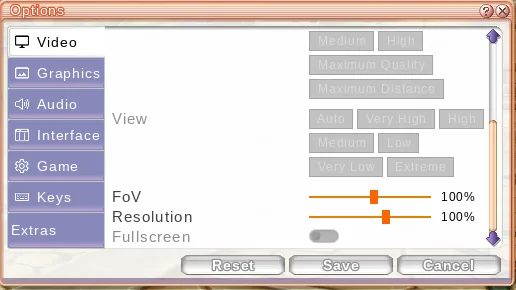
Open Start → Options. The window has tabs: Video, Graphics, Audio, Interface, Game, Keys and Extras. Changes apply straight away. Reset only resets the tab you're on. Greyed-out rows aren't available yet.
Video
- Textures: Low / Medium / High, or Cartoon (toon shading). Default: High.
- FPS: VSync (default), 14, 24, 30, 60, 75, 120, 144, 240 or Uncapped.
- Field of View: 60-140 (default 100).
- Resolution: 25-150% (default 100%). This only scales the 3D world. The UI stays sharp. Lowering it is the best single fix if the game feels slow.
Graphics
- Advanced Shaders: off = Classic (the Original's look). On = Enhanced: nicer sky, moving water, wind, grass, lamp light and fog. It costs some performance.
- Outline: draws an outline around characters (default off).
- Weather (default off).
- Detailed Players: how many nearby players are drawn in full detail: 30, 60 (default), 100, 200 or 400. Lower it in busy towns.
Audio
Music and Sound volume. When the music changes between areas it fades smoothly instead of cutting.
Interface
- Scale: 50-150% (default 100%). This works on top of your screen's own scaling, so the UI looks the right size on high-DPI and Retina screens.
- Transparent chat (default on): the chat frame fades when you're not using it.
- HP Bar Damage History and join notifications.
Game
Hide Other Players, refuse whispers, party invites, friend requests or trades, turn off the tutorial Pang, Basic Keyboard Mode (Original-style controls), Fixed Camera, Invert camera and Expand Camera Viewpoint.
Keys
Click an action, then press a new key. If that key is already used, the two actions swap. Escape cancels and Reset restores the defaults. Enter, Escape, Shift, Ctrl, Alt and Caps Lock can't be bound.
Extras
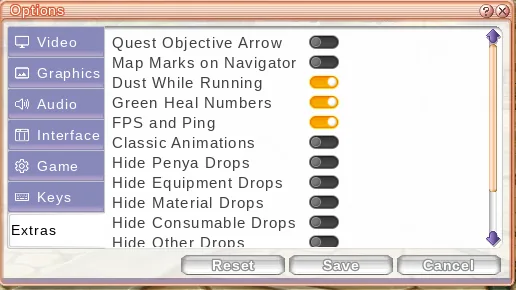
Quest Objective Arrow, Map Marks on Navigator, Dust While Running, Green Heal Numbers, FPS and Ping (the counter under your status window), Classic Animations, and Hide … Drops filters, so you don't see Penya, equipment below a chosen grade, materials, consumables or other drops on the ground.
WebGPU vs WebGL
The browser can draw the game in two ways:
- WebGPU (the default when your browser has it) is newer and usually faster.
- WebGL is the older fallback that runs almost everywhere.
The game picks WebGPU by itself. If WebGPU won't start, for example because of an old driver, a software-only GPU or a crash, it switches to WebGL automatically and remembers that. To force WebGL yourself, open the game with ?renderer=webgl at the end of the address.
Getting smooth FPS
- Use a Chromium browser (Chrome, Edge, Brave) with hardware acceleration on.
- On laptops, plug in and pick the high-performance GPU.
- Drop Resolution to 75% or lower.
- Turn Advanced Shaders off.
- Lower Detailed Players, or turn on Hide Other Players in crowded towns.
- If the game feels choppy on WebGPU, try
?renderer=webgl(or the other way round).
The first time you visit a new area, it can hitch for a moment while its files download. After that they're cached.