

Pets
Doggy and other pickup pets, the loot filter, raised pets and buff pets.
Pickup pets
A pickup pet follows you around and picks up loot for you.
- Everyone gets one: finishing your 1st job change (level 15) gives you Doggy, a permanent pickup pet bound to that character. It's an Aerlore reward.
- More pickup pets cost 150 Aerlore Coins each at Waforu's Pets tab in Flarine. Finishing the Coral Island story also gives the Baby Blue Dragon.
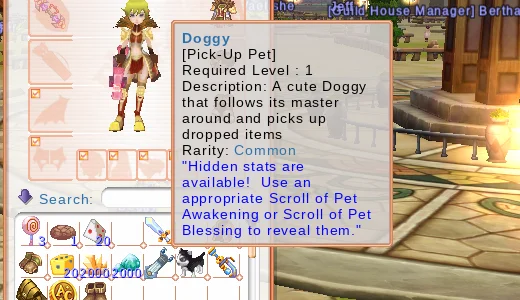
To summon it, double-click the pet in your bag. Do the same to put it away.
How it picks up:
- It looks for loot within 18.75 m (Original: 15 m) and checks twice as often as in the Original.
- It only takes loot you're allowed to pick up (yours, your party's, or anyone's once it's free).
- With a full bag it only picks up Penya. It doesn't collect while you're flying.
Loot filter
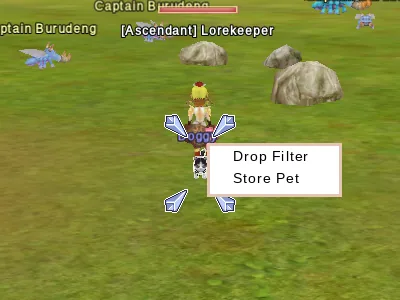
Click your own pet for a small menu with Drop Filter and Store Pet.
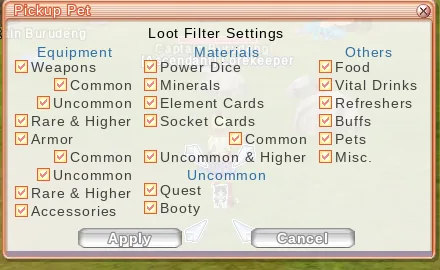
Drop Filter opens the Loot Filter Settings. Untick what you don't want: weapons and armour by rarity, accessories, Power Dice, minerals, element and socket cards, quest items, food, drinks, buffs and more. Penya is always picked up. The filter is saved for each character.
Aerlore vs the Original: the loot filter and the pet menu are new. There's also a drop filter for the ground (what you see dropped) in Options → Extras.
Raised pets
The Original's raised pets work as before. Hatch an egg, feed your pet and raise it from F to S at the Pet Tamer in Flarine. Eggs, hatch and tamer scrolls, and pet food can be bought with coins at Waforu.
The Baruna pets are disabled in Aerlore.
Buff pets
The Original's buff pets with VIS stones are live. VIS stones and keys are sold by Waforu.
You can't mount a board or broom while a pet is out. See Flying.